.png?width=130&height=130&name=Crestwood%20Associates%20%20(8).png)
MIGRATE FROM QUICKBOOKS TO ACUMATICA IN 60 DAYS
A predictable, fixed-fee migration designed for growing companies that have outgrown QuickBooks and need stronger controls, better reporting, and a more reliable support experience.
What You Can Expect:
A structured migration plan with:
1. Fixed-fee pricing
2. Defined scope
3. A clear 60-day timeline
4. No surprise invoices
5. Support that replaces the frustration many experience with QuickBooks
Schedule Your Assessment
What’s Included in the 60-Day Rapid Start
USERS AND DASHBOARDS
- Setup for unlimited licensed users
- Prebuilt dashboards for controller, AR, AP, warehouse, purchasing, shipping, and customer overview
TRAINING AND ENABLEMENT
- Acumatica Academy coursework completed in advance
- One remote training session per module
- Clear expectations for internal training workload
SCOPE CLARIFICATION
- Additional companies
- Integrations
- Historical transactions
- Custom workflows
- Manufacturing setup
- WMS or advanced inventory
- Data cleanup or restructuring
CORE FINANCIAL SET UP
- Predefined chart of accounts
- GL configuration
- Mapping of QuickBooks accounts
- Beginning balances
- One income statement and one balance sheet
DATA MIGRATION
- Customers, vendors, and items
- Open AR and AP
- Inventory balances
- Structured mapping guidance
- Clear documentation on what does and does not migrate
OPERATIONAL MODULES
- Accounts receivable
- Accounts payable
- Inventory
- Sales order
- Purchase order
- Branded forms
Is Rapid Start Right for You?
Strong Fit:
- You have one legal entity
- Your inventory structure is straightforward
- You want to be live quickly with core financials
- You want predictable cost and a defined scope
- You are ready to leave behind manual processes and workarounds
- You manage complex manufacturing or project accounting
- You operate multiple companies or consolidations
- You need integrations on day one
- You have custom workflows or advanced automation requirements
What the 60-Day Experience Looks Like
Week 1:
- Kickoff, project plan, data extraction
Week 2:
- Chart of accounts review
- Module configuration
Week 3:
- Migration of customers, vendors, items
- Initial validation
Week 4:
- Financial verification
Week 5:
- User setup
- Dashboards and document branding
Week 6:
- Training sessions
- Workflow walkthroughs
Week 7:
- Migration of open AR, open AP, inventory balances
- User acceptance testing
- Adjustments and validation
Week 8:
- Go live
- Stabilization period
Real Client Example: PostcardMania
PostcardMania is a high-volume marketing company that outgrew QuickBooks as transaction volume increased and manual processes slowed operations.
Why They Moved Off QuickBooks
-
Limited visibility across finance and operations
-
Manual processes that slowed order processing and fulfillment
-
Reporting that could not scale with growth
Results After Moving to Acumatica
-
Automated key financial and operational workflows
-
Real-time visibility for better decision-making
-
Systems that scaled without adding headcount
This is a common path for growing QuickBooks users who need stronger control, visibility, and scalability.
QuickBooks vs Acumatica
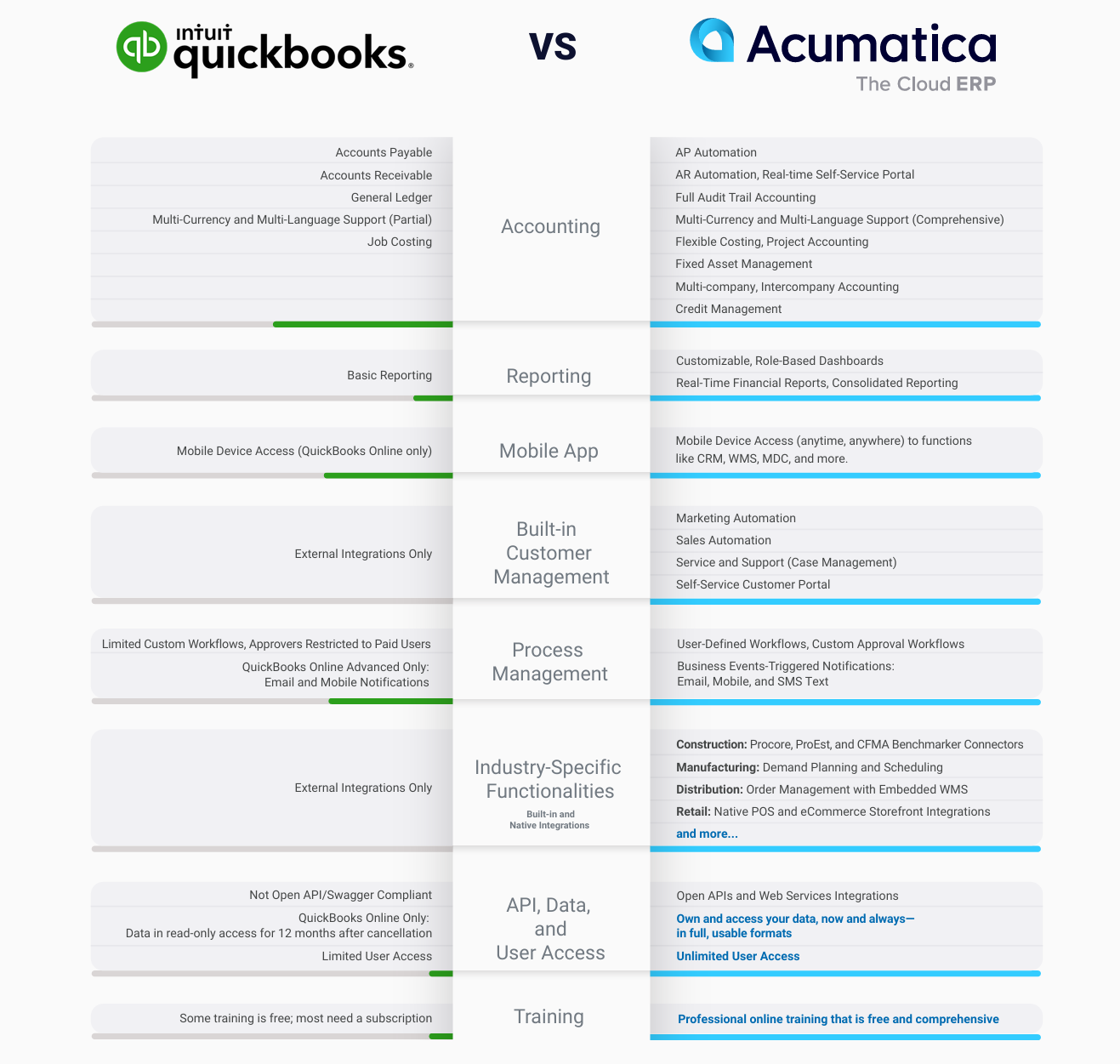
Support That Replaces QuickBooks Frustration
Many QuickBooks users describe support as inconsistent, slow, or difficult to navigate. Crestwood provides a more structured and reliable support experience.
Included Support Resources
- In-house ERP support team
- Online portal for ticket submission and tracking
- Full visibility into ticket progress
- Clear response expectations
- Knowledge-base articles and how-to guides
Go-Live Support
- Real-time responses during launch
- Stabilization period to ensure accurate operation

- 24/7 Online Support Portal access to submit, monitor, and track support requests.
- Dedicated in-house support and customer success team and for ongoing optimization, continued help desk access, and advisory guidance.
You are supported by a team that understands your system, your data, and your business structure.
Frequently Asked Questions
Will I lose my QuickBooks history?
- Historical transactions do not migrate, but they remain available through exported reports. All essential starting balances are brought into Acumatica.
How much internal work is required?
- Your team will attend short review meetings, verify data, and complete required training.
What happens if we fall behind?
- We will walk you through a revised timeline. Communication is clear and frequent.
Do integrations come with this package?
- Integrations are optional and scoped separately.
How do we get support after go live?
- You will have immediate access to our online support portal and our in-house ERP support team.
Next Steps:
-
1. Schedule Your Migration Assessment
-
2. Download the QuickBooks Migration Checklist
-
3. Request the Detailed Scope Document