Eliminate spreadsheet-based approvals and manual reconciliation using native configuration
Replace spreadsheet approvals with structured routing and controls
Set proactive alerts so finance stops reacting at month-end
Improve close predictability and cash visibility across AP/AR
45 minutes · Thursday, March 26 · 9:00am ET · Live + Recording
Can’t attend live? Register and we’ll send the recording.
Save Your Seat
Leave with This
What you’ll be able to implement immediately
Approval routing controls that replace spreadsheet sign-offs
Exception alerts and rules to catch issues before month-end
Better AP/AR visibility to support a faster, more predictable close
This is a practical, finance-led walkthrough of real workflows in Business Central so you can apply what you learn right away.
Register to get the live session + recording.
Live Walkthrough
What we'll cover in 45 minutes
A hands-on, finance-led walkthrough of AP, AR, and close workflows inside Business Central.
Approvals: routing rules, thresholds, and controls
Alerts: exceptions that surface issues before month-end
Visibility: AP/AR views that support cash and close decisions
Practical guidance: what’s configuration vs process change
Best for: Finance teams already live on Business Central (at least one close completed).
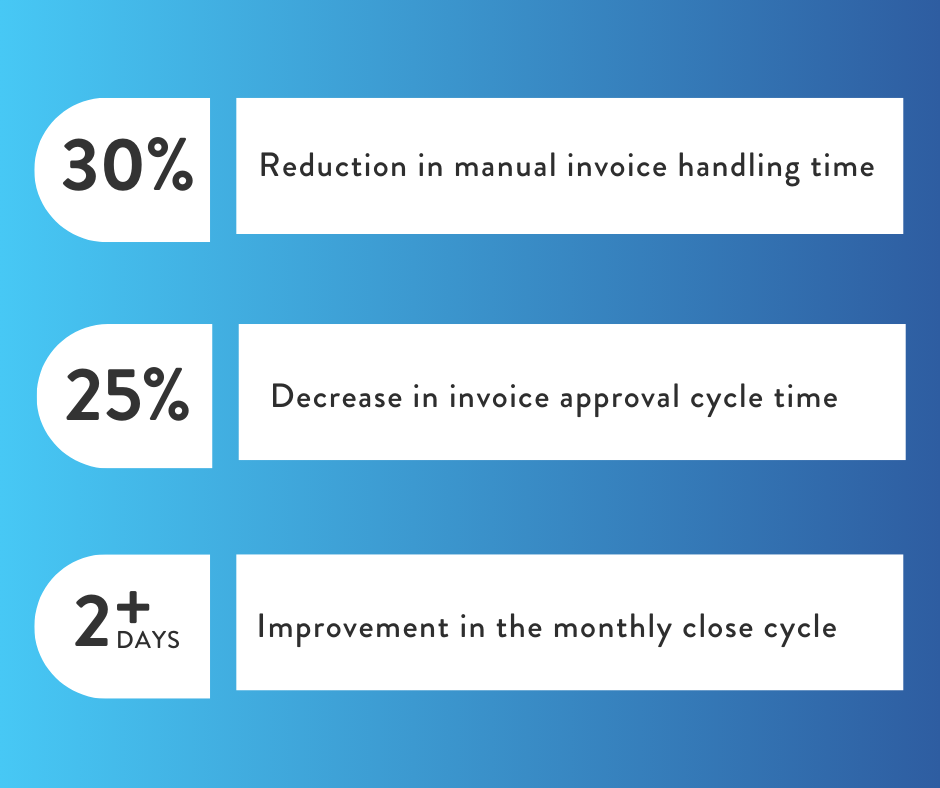
What this looks like in practice
Here’s an example of the workflow changes finance teams make inside Business Central to reduce manual work and improve month-end predictability.
Business Profile:
$30M–$100M revenue · 3–6 person finance team · 7–10 day monthly close
Before optimization
Invoice approvals managed through email chains or spreadsheets
Payment and posting reviews handled line-by-line with limited controls
Cash and close status tracked outside Business Central
After optimization
Invoices digitized and routed automatically with approval rules
Exceptions surfaced early through alerts and approval thresholds
Visibility across AP, AR, and open items to support faster close decisions
Want to see what this looks like in your environment? Save your seat.
Meet Your Hosts
Finance-led, Business Central experts focused on practical automation you can apply immediately.
Stephanie McColly
Chief Marketing Officer & Business Integrator
Stephanie helps mid-market teams move from manual, reactive processes to automated, data-driven operations. With 20+ years across finance, operations, and systems, she focuses on practical workflow design that improves visibility, control, and execution.
20+ years in ops + systems optimization
EOS Integrator focused on process execution
Works with finance teams to reduce manual work and improve close predictability
Jason designs and implements Business Central solutions that streamline finance workflows and improve day-to-day execution. He specializes in Business Central configuration, automation, and reporting so teams can reduce manual work and get cleaner, faster financial visibility.
Business Central solution architecture + automation
Workflow optimization and exception-based process design
Reporting and analytics to support finance decisions